The VenariX Incidents API enables cybersecurity teams to integrate detailed cyber threat intelligence directly into their tools and processes. Teams can automatically identify relevant incidents, trigger predefined responses, and streamline reporting without manual effort.
Structured Incident for Custom Workflows
The VenariX Incidents API provides structured, filtered access to incident data so you can focus only on what’s relevant to your organization. You can retrieve data by date, country, region, sector, incident type, breach status, or corporate structure and integrate it directly into your existing tools and workflows.
Here’s what you can do:
Filter and retrieve incidents by industry, country, region, attack type, and more to keep dashboards and reports focused on your environment.
Enrich SIEM or SOAR alerts with incident details such as threat actor name, initial detection date, and hacker‑site disclosure date.
Track organizations of interest and follow the full incident timeline, from initial access to public disclosure, to provide better context for risk reviews.
Automate notifications and reports by feeding the API’s JSON output into Slack, Jira, Power BI, or low‑code platforms like n8n.
The result is a direct, reliable data feed that fits into your workflow without extra manual steps.
Use Case: How a Small MSSP Scaled Incident Response with the VenariX Incidents API.
The Challenge
A small Managed Security Services Provider (MSSP) supporting over 140 small- and mid-sized U.S. healthcare clients needed sector‑wide, real‑time visibility into ransomware incidents to take immediate, coordinated action. The team aimed to achieve the following:
Increase Endpoint Detection & Response (EDR) sensitivity for any customer affected by or connected to a newly reported ransomware incident.
Send email advisories to customers as soon as relevant incidents are identified.
Respond within the required timeframes defined in service-level agreements (SLAs) without relying on manual review.
How the VenariX Incidents API Helped:
The team built a four-step workflow using the VenariX Incidents API to identify and respond to relevant incidents across their customer base. The process involved pulling incident data, matching it against the customer list, triggering predefined actions upon a match, and logging all activity for reporting. Here’s how it worked:
1. Pulled Incident Data Every 15 Minutes
The team set up a scheduled job to query the VenariX API for all ransomware incidents in the U.S. healthcare sector from the past 48 hours:
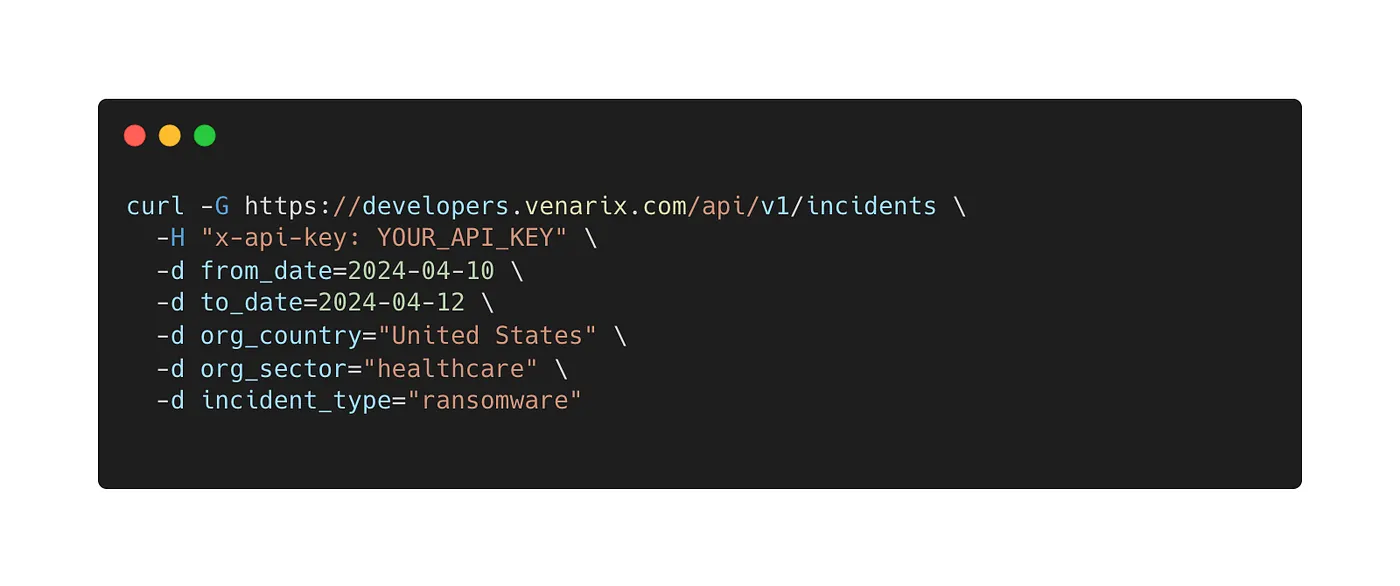
The API returned structured data for each incident, including fields like organization name, website, threat actor, and incident date. This allowed the team to work with the data programmatically.
2. Matched Incidents to Customer List
The API response included the potentially impacted organization’s name and website. These fields were cross-referenced with the MSSP’s internal list of active customers. If there was a match, or if the organization was a known peer or vendor of a customer, the incident was flagged with high severity. A Jira ticket was automatically created for internal tracking and customer support follow-up when this occurred.
3. Triggered Automated Actions
For each matched incident, a predefined playbook ran automatically:
Endpoint protection settings on potentially impacted customer computers and servers were adjusted to a high-sensitivity profile using the EDR provider’s API.
A summary email with incident details (e.g., threat actor name, incident date, potential impact) was sent to the customer’s CISO or security point of contact.
4. Logged and Reported Incidents
All high-severity incidents were logged automatically in the MSSP’s reporting system. A daily summary report was generated, showing which customers were affected, what actions were taken, and how quickly the response was initiated. This supported both internal tracking and customer reporting requirements.
The Results
High-severity incidents were identified and escalated within 30 minutes of being published via the API.
The team no longer needed to manually review email alerts or maintain spreadsheets to track relevant incidents.
Customers were notified quickly when an incident affected them directly or indirectly through a known peer or vendor.
Each action (EDR changes, CISO notifications, and follow-up) was logged automatically, making it easier to report on activity during internal reviews or customer meetings.
The VenariX API didn’t replace existing tools. Instead, it allowed the team to act on relevant incident data faster and with less manual work.
Use Cases Beyond Cybersecurity
The VenariX Incidents API isn’t limited to security workflows. Business, communications, and compliance teams can also tap the data to stay ahead of issues that affect investors, suppliers, customers, and regulatory obligations:
Investor Relations — Track breaches affecting portfolio companies and prepare early shareholder briefings.
Procurement / Supply‑Chain — Monitor suppliers for confirmed incidents and trigger alternate‑vendor reviews when a key partner is hit.
Cyber‑Insurance Underwriting — Pull sector and region statistics to refine loss‑probability models and set premiums.
Compliance & Audit — Log confirmed breaches in regulated jurisdictions to meet reporting deadlines and retain evidence for audits.
Step-by-Step: Getting Your VenariX API Key
The VenariX Incident API is available on paid subscriptions. To access your API key:
Log in to your VenariX account.
Go to the profile icon in the top-right corner.
Select Profile, then Security, and scroll down to the API Management section.
From there, you can generate, copy, or reset your API key as needed.
Once your key is generated, you can configure the API based on your needs, from making your first queries to automating alerts and integrating results into your tools.
Your Intelligence, Your Logic, Your Platform
At VenariX, we believe that cybersecurity data has value far beyond security teams. It can support risk, compliance, communications, and business operations. With the API, you have the flexibility to apply structured, curated incident data wherever it’s needed, using your own logic, priorities, and tools.
