Many platforms support third-party integrations to extend functionality and improve efficiency. For example, Slack integrates with Google Drive, allowing users to share and update files directly from chat. Similarly, Zoom integrates with Microsoft Outlook to make it easier to schedule and join meetings from the calendar.
Most of these integrations use OAuth, where a user authenticates and grants consent for one application to access another on their behalf. After consent is given, an OAuth access token is created and used to enable ongoing access. If the token is exposed or if a user is tricked into granting consent, the integration can be abused.
This risk has been realized in recent incidents, including the Salesloft Drift and the Salesforce Data Loader campaigns. Both are real-world examples of how third-party integrations can create systemic exposure, even when the main service being used is not directly compromised.
In this edition, we outline practical steps that organizations can take to manage the risks associated with third-party app integrations.
What Are Third-Party Apps?
Third-party apps are applications developed outside of a core platform but granted access to its data and functions. Organizations often use them to extend the platform’s capabilities, automate tasks, and integrate workflows across different services. Examples include customer engagement tools linked to Salesforce, scheduling add-ins connected to Microsoft 365, and productivity extensions installed in Google Workspace.
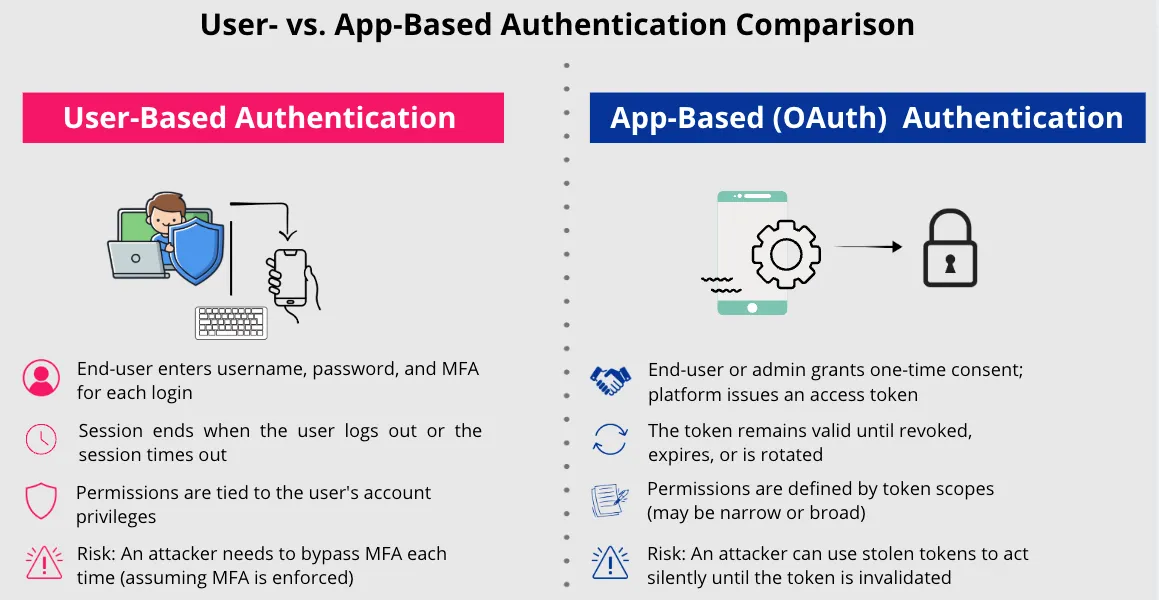
These apps connect using authorization frameworks such as OAuth. Instead of requiring repeated username and password logins, a user or administrator approves the app to connect. The platform then issues the app an OAuth access token that defines what the app can do, known as its scopes. Scopes may be narrow, such as read-only access, or broad, such as the ability to create, update, or delete data.
The critical difference from user-based authentication is that OAuth access tokens allow the app to interact with the platform directly once approval is granted. This means the app can access data and perform actions without the user being involved each time. If attackers obtain an OAuth access token, they inherit the same access and can operate without needing the user’s password or MFA code.
Risks of Third-Party Apps
Third-party app integrations expand the attack surface in several ways:
Broad OAuth Scopes
Many third-party apps request more permissions than they actually need. If a token with those permissions is stolen, an attacker may be able to read, change, or delete large amounts of data.
Persistence of Tokens
A user login ends when the session times out or the user logs out. OAuth tokens, by contrast, remain valid until they are revoked, rotated, or expire. An attacker who gains access to a token can continue using it in the background without the user noticing.
Untracked App Inventory
In many organizations, there is no reliable inventory of which third-party apps have been connected, what data they can access, or how they are used. Without this visibility, security teams may not notice when a risky app has been added or when an integration begins accessing more data than expected.
Lack of Monitoring
Even when third-party apps are known, their activity is rarely monitored with the same rigor as user accounts. Most companies track user logins, failed authentication attempts, and unusual account behavior, but they do not apply the same controls to apps authenticated through OAuth. This gap allows third-party integrations to operate with broad access in the background, creating opportunities for abuse that may never trigger alerts.
Uncontrolled Consent
When users are allowed to approve third-party apps on their own, those apps can gain access to company data without any oversight. This makes it possible for malicious or overly permissive apps to be connected without the knowledge or approval of administrators. This risk is often exploited through consent phishing campaigns.
Untrusted Publishers and Developers
Apps built by unknown or unverified publishers and developers can introduce another risk. Without controls to verify publishers, attackers can create apps that appear legitimate but are designed to misuse the access they receive. Once approved, these apps could be used to exfiltrate data, insert malicious content, or launch further attacks inside the environment.
Consent Phishing
Consent phishing is a specific attack pattern in which a malicious app is presented to users via a legitimate OAuth consent screen. If the user accepts, the attacker’s app receives an access token with the approved permissions. From that point on, the app has the same data access as any trusted integration.
This technique bypasses password theft and MFA entirely, since the consent process itself is valid. Attackers often request broad scopes, such as access to email, files, or contacts, to maximize the value of the token. Without governance controls that restrict who can approve apps and periodic reviews of what has been granted, these malicious apps can stay connected for long periods undetected.
Real-World Examples of Third-Party App Abuse
Two incidents in 2025 involved the abuse of third-party apps: Salesforce Data Loader (March 2025) and Salesloft Drift (August 2025). Both have been covered extensively elsewhere. Here we summarize the key points and lessons learned.
Initial Access
Salesloft Drift: Attackers compromised a Salesloft GitHub account, resulting in unauthorized access to Drift’s AWS environment. OAuth tokens were stolen and used to access customer Salesforce and Google Workspace integrations.
Salesforce Data Loader: Attackers impersonated IT support and tricked users into installing a fake “Data Loader” app. By granting OAuth consent, users unknowingly provided attackers access to their Salesforce environments.
Weakness Likely Exploited
Salesloft Drift: Weak developer account protections and lack of GitHub activity monitoring.
Salesforce Data Loader: Open user consent, no access restrictions, and missing publisher verification allowed approval of a malicious app.
App Type
Salesloft Drift: A trusted, enterprise-level integration approved organization-wide.
Salesforce Data Loader: A malicious app disguised as a legitimate Salesforce tool.
Impact
Salesloft Drift: Large-scale data exports from Salesforce environments, including sensitive records and credentials.
Salesforce Data Loader: Unauthorized access to Salesforce environments with user-granted permissions.
Key Takeaway
Salesloft Drift: Even trusted vendors can introduce systemic risk if their own security practices are weak.
Salesforce Data Loader: Unrestricted user consent without governance enables malicious apps to function as if they were legitimate.
For further reading, see the following advisories from Google, Salesforce, and Salesloft:
Protect Your Salesforce Environment from Social Engineering Threats Drift/Salesforce Security Update
How to Manage Third-Party App Risk
The Salesloft Drift and Salesforce Data Loader incidents show that organizations need to do more than simply rely on vendor assurances or user judgment to keep third-party integrations secure. A structured approach is needed to reduce the risks from third-party apps. This should cover the full lifecycle of how apps are connected, approved, monitored, and, when necessary, removed.
Key Elements of Third-Party App Governance
Inventory: Maintain a current inventory of all third-party apps connected to core SaaS platforms.
Approval: Require administrator approval for all third-party apps, backed by formal vetting, clear rules on which categories of applications are permitted (for example, some organizations may prohibit third-party AI apps), and vendor agreements that set baseline security requirements.
Control:
Enforce least-privilege scopes so apps only get the access they need.
Apply access restrictions and session limits where supported.
Restrict OAuth consent through policies that define which apps can be approved, under what conditions, and by whom.
Require apps to come from verified publishers and developers.
Review: Conduct regular reviews of third-party apps in the same way user accounts are reviewed. Identify inactive apps, check whether granted permissions are still appropriate, and remove apps that are no longer needed.
Monitoring: Track app activity with the same rigor applied to user accounts, looking for unusual queries, bulk exports, or anomalous behavior.
Detection: Actively look for signs of malicious app activity, such as suspicious consent grants or abnormal token use. Use audit logs and app governance tools to flag unauthorized or risky behavior.
Response: Establish a process to revoke tokens, rotate credentials, and notify stakeholders when a third-party app is compromised.
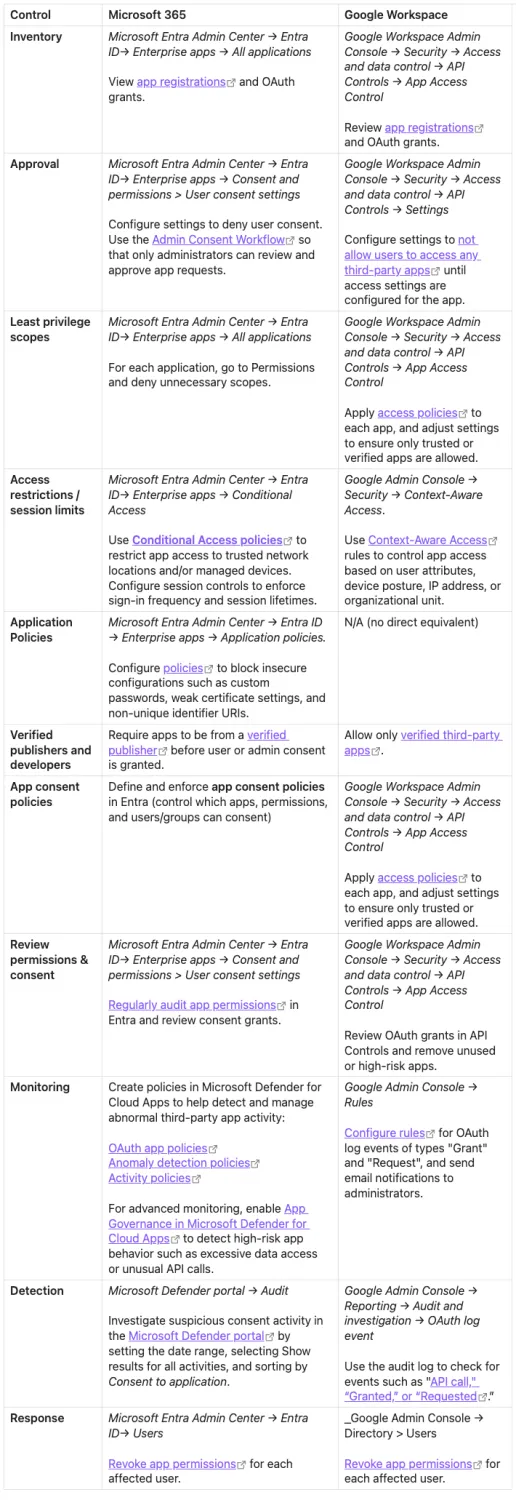
Platform-Specific Third-Party App Controls: Microsoft 365 vs. Google Workspace
Each SaaS platform provides its own mechanisms for managing third-party app integrations. Security teams should understand the available controls and ensure they are properly implemented and in use.
Below, we provide a list of controls that can be applied in Microsoft 365 and Google Workspace.
Other platforms offer similar controls:
Salesforce: Connected App policies (IP restrictions, session timeouts, scope limits) and Event Monitoring for OAuth activity.
Slack: App management settings that allow only pre-approved apps, along with audit logs for OAuth grants.
GitHub: Organization-level policies to restrict OAuth app usage, require verified apps, and audit OAuth tokens in use.
These controls vary in implementation, but the principle remains the same: limit which apps can connect, define their capabilities, monitor their activity, and revoke access promptly when necessary.
User Awareness Remains the First Line of Defense
While technical controls reduce risk, they are not always enough on their own. Users need to understand how to identify suspicious third-party app consent requests, recognize the warning signs, and know when to decline or report them rather than approve them. Malicious apps are often delivered through an email link or a web page that leads to a consent screen, but they can also be introduced through other social engineering techniques, such as voice phishing, as seen in the Salesforce Data Loader campaign. Regardless of how the user is targeted, the consent screen is hosted by a legitimate identity provider, which makes it appear legitimate. Attackers take advantage of this trust and often request broad permissions such as access to email, files, or contacts. Users should be trained to read these prompts carefully, question apps from unknown developers and publishers, and report anything unusual.
Administrators have a responsibility to set clear rules on which types of apps are permitted, restrict consent to trusted publishers, and review granted permissions regularly. Combining these technical controls with user awareness is the most effective way to defend against consent phishing and other abuses of third-party integrations.
