E-skimming, also known as digital skimming, web skimming, or online card skimming, is a technique used by attackers to steal payment card information and personal data from consumers during the checkout process on e-commerce websites. In this edition, we will explain how e-skimming works, how attackers gain access, how the stolen data is exfiltrated, what happens to the compromised information, and how to minimize the risk of these attacks.
Understanding E-skimming
E-skimming is a cyberattack method derived from traditional credit card skimming. But instead of relying on physical hardware attached to point-of-sale (POS) terminals, e-skimming attacks occur entirely online, targeting e-commerce websites with malicious scripts that capture consumers’ payment details as they enter them on a checkout page. The captured information is then transmitted to an attacker-controlled server.
Who is Affected
E-skimming attacks impact both consumers and merchants. Consumers may have their payment data stolen, while merchants often face reputational damage, chargebacks, compliance violations, and financial losses, sometimes without realizing the breach occurred. Additionally, e-skimming attacks target both standalone e-commerce sites and hosted e-commerce platforms, such as CommerceV3 or BigCommerce. When attackers compromise these platforms, the impact is significantly greater, since malicious scripts placed at the platform level can steal payment information from all merchants who rely on that platform.
How These Attacks Work
E-skimming attacks typically follow a 3-stage approach:
Gaining initial access
Installing the malicious script
Exfiltrating data
Gaining Initial Access
Attackers must gain initial access to the target e-commerce environment before they can inject the skimming code, which usually comes from one of the following methods:
Exploiting unpatched vulnerabilities on e-commerce platforms is a common vector. For example, merchants running end-of-life platforms, such as Magento Version 1, are frequent targets due to known, unpatched vulnerabilities. Plugins tied to e-commerce functionality are also a common attack vector. Attackers may modify the code of a legitimate file within a plugin to insert malicious code, potentially granting administrative access to the environment.
Access can also be obtained through compromised administrative credentials. Methods include phishing, password guessing, or brute-force attacks against admin login portals. In some cases, administrative database credentials are stored in clear text or hardcoded into application files, which gives attackers direct access.
Many e-commerce sites depend on scripts from third-party service providers (TPSPs) to support analytics, marketing, and payment processing. If attackers compromise these third-party scripts or embed malicious code in third-party products, such as shopping cart software, they can inject skimming code into the merchant’s website without detection by the merchant or TPSP. This issue is amplified when the third-party script loads additional scripts from other servers (fourth-party or beyond), increasing the risk surface without the merchant’s awareness.
In certain cases, attackers use cross-site scripting to redirect users to a malicious domain. Once redirected, malicious JavaScript on that compromised domain captures the consumers’ data directly from the checkout page.
Installing the Malicious Script
After gaining initial access, the attacker injects the malicious code, which typically involves client-side JavaScript designed to capture payment data in real time as it’s entered into the checkout form:
Attackers insert JavaScript directly into the HTML or JavaScript files that control the checkout or payment process.
Some threat actors replace existing payment forms entirely with a fake one designed for skimming.
Malicious scripts can also be hidden within code that mimics or comes from legitimate third-party vendors (e.g., Google Tag Manager, analytics services, ad platforms).
In cases where access is gained through a compromised third-party vendor, the skimmer is delivered as part of the normal script loading process across all affected client websites.
Exfiltrating Data
Generally, once customer payment card data is captured from checkout pages, it is sent back to a server controlled by the threat actor. Most groups send the information using hidden background requests that mimic normal website activity. Others go further by hiding data inside fake image requests, making detection harder.
To support this ongoing exfiltration, Visa’s Payment Fraud Disruption (PFD) team has observed that once attackers gain access, they often deploy web shells to establish a persistent backdoor and set up command-and-control (C2) infrastructure.
Types of Data Stolen
E-skimming attacks typically capture the details needed to make online purchases, including:
Consumer’s full name
Payment card number (credit or debit)
Payment card expiration date and security code (CVV)
Attackers may also collect additional data, such as billing addresses or email addresses.
How the Stolen Data Is Used
After cybercriminals steal payment data via e-skimming, they usually cash in on it through various schemes:
Typically, attackers quickly sell the stolen information, such as card numbers, expiration dates, CVVs, and personal details (names, addresses, phone numbers), on online marketplaces.
Criminals who buy or obtain this stolen data typically use it to make unauthorized purchases, often maxing out victims’ credit cards. According to Mastercard, there’s typically a delay of about 5 months between the initial theft of payment information and the onset of fraudulent transactions. During this period, criminals test and resell stolen data, making early detection difficult.
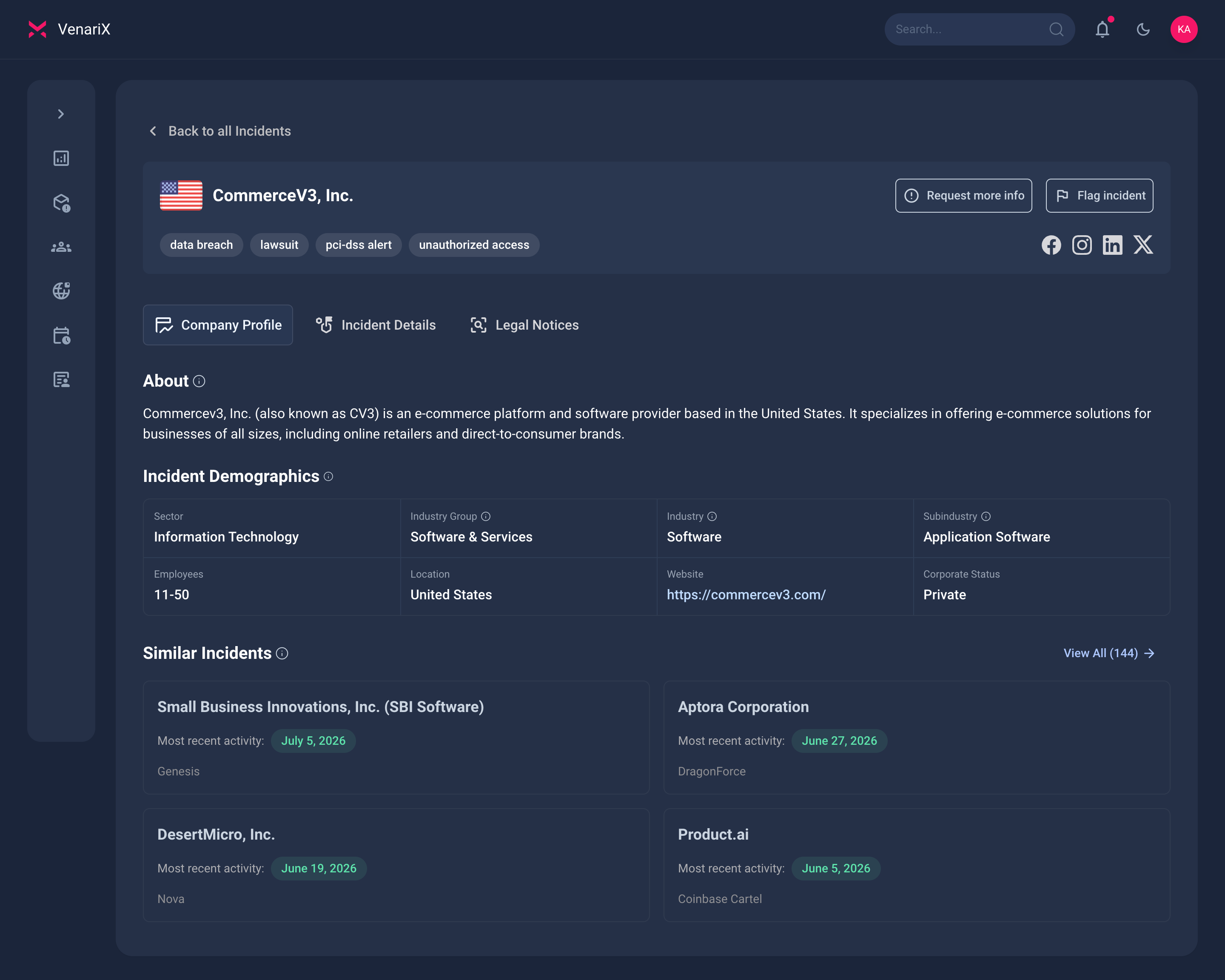
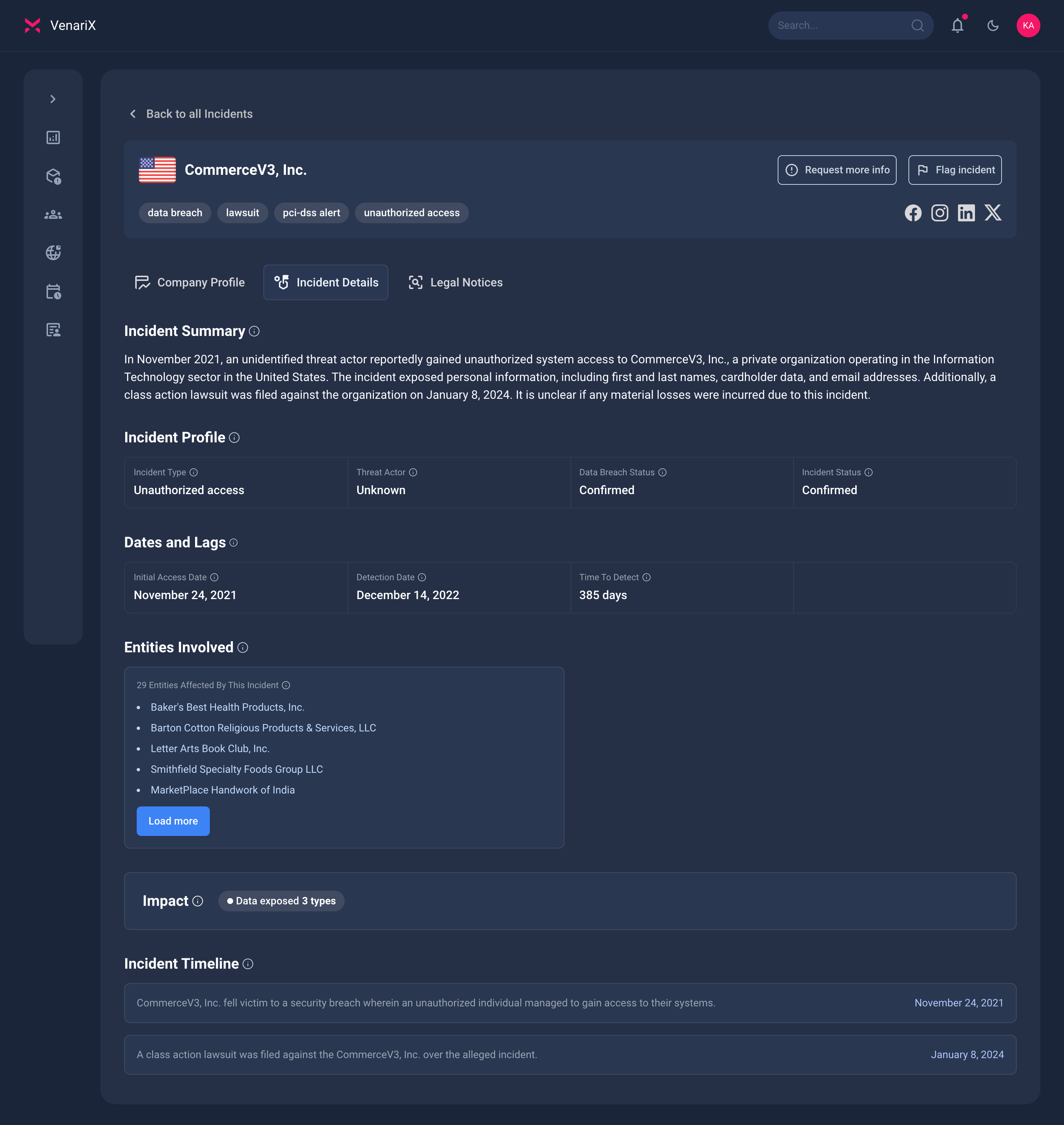
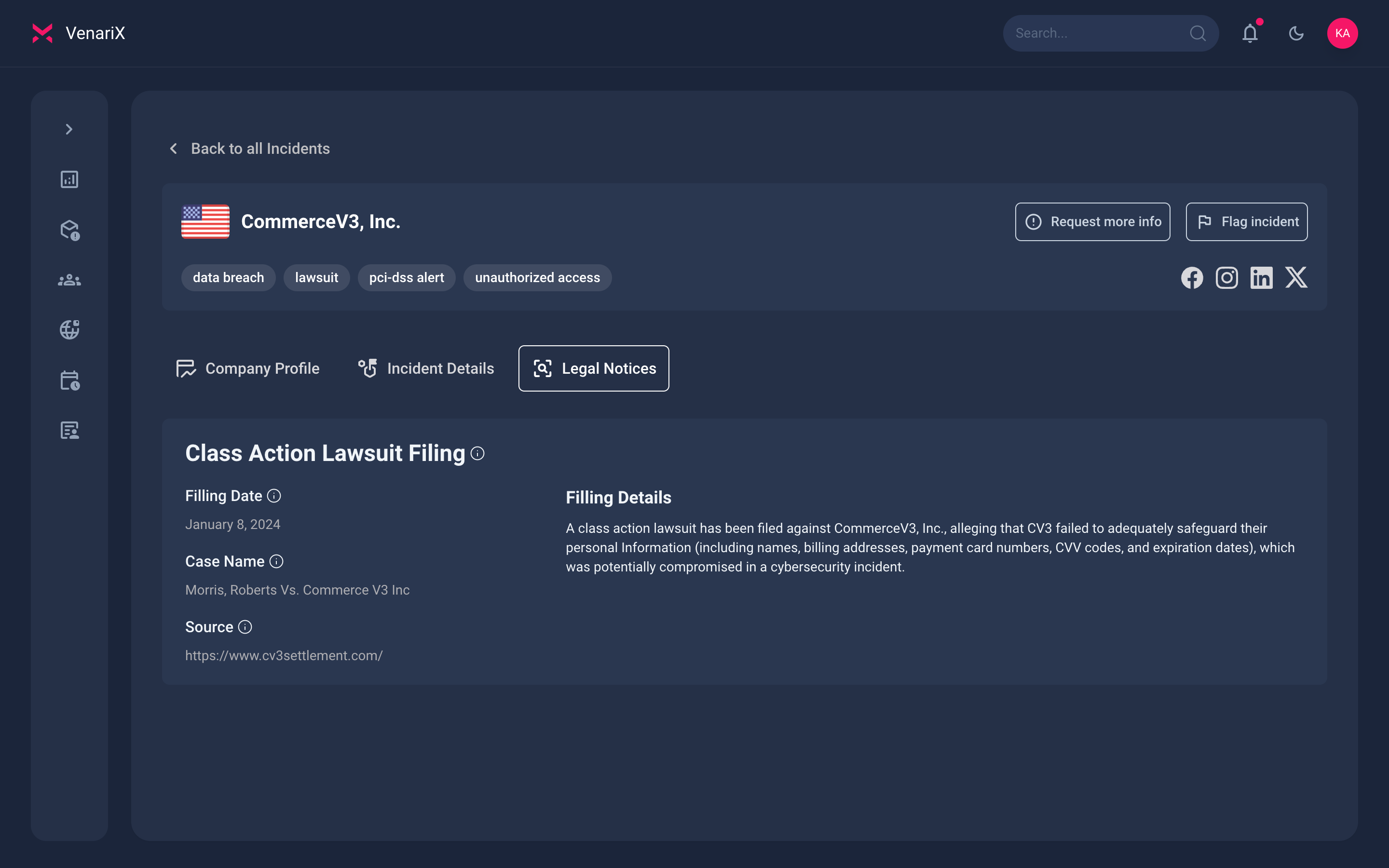
Real-World Example: CommerceV3 Incident
n November 2021, CommerceV3, a U.S.-based hosted e-commerce provider, experienced a security breach that exposed payment card information from numerous consumers. An attacker gained unauthorized access to CommerceV3’s systems and installed a malicious script that captured payment details as customers completed purchases on merchant websites hosted on the platform. In this case, individual merchant websites were not compromised. Instead, the attacker uploaded the script to CommerceV3’s servers, allowing them to collect payment details from transactions processed on the platform. Based on our research, at least 28 merchants using CommerceV3 were affected.
The incident ultimately led to a class action lawsuit against CommerceV3, which was settled for an undisclosed amount.
Actors Behind E-skimming
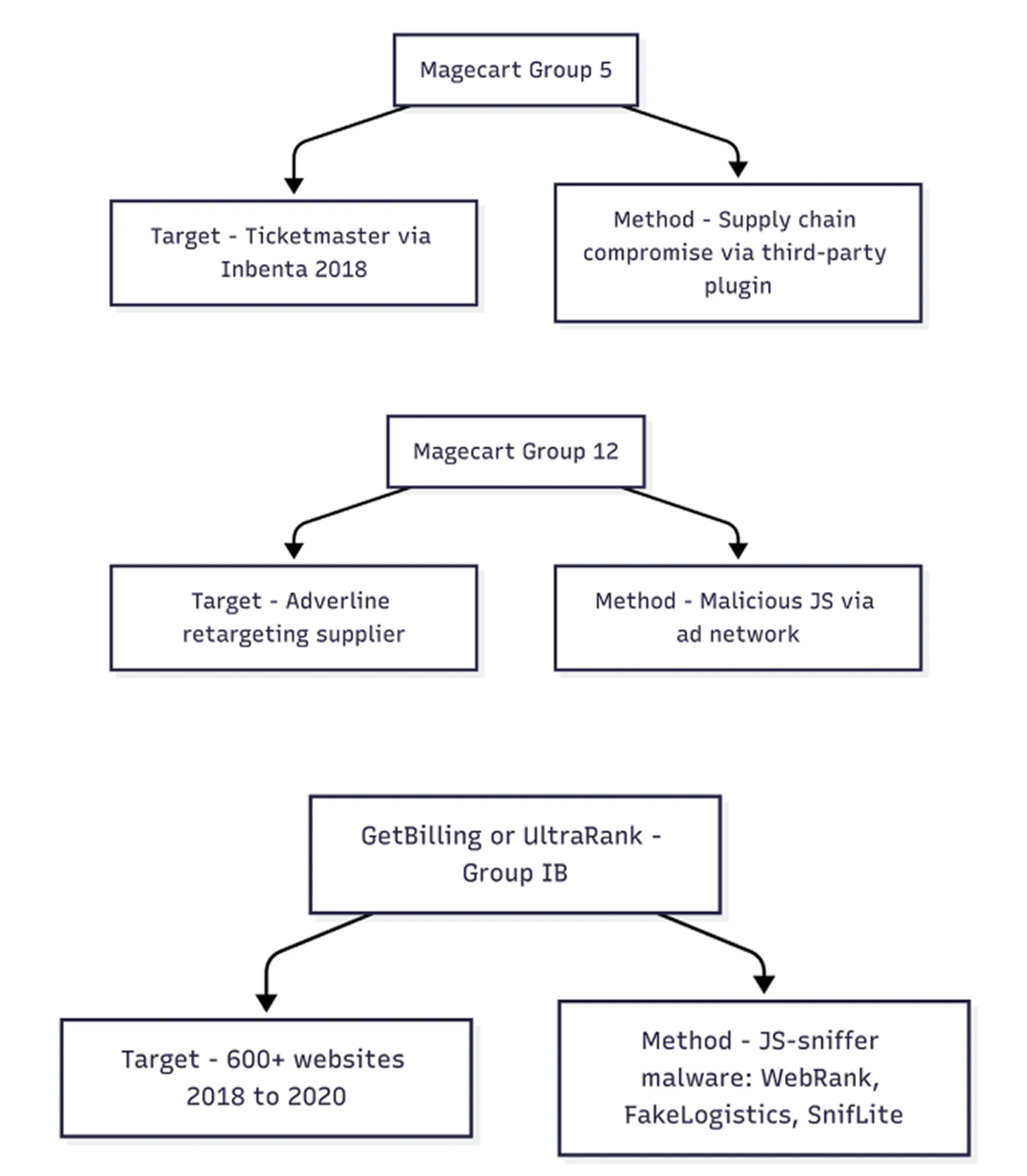
“Magecart” is a generic term for multiple unrelated groups involved in digital skimming operations. As of 2025, more than ten subgroups have been identified. [RiskIQ & Flashpoint, 2018]
Key examples include:
Magecart Group 6 — Linked to British Airways and Newegg. [RiskIQ, 2018] [RiskIQ, 2018]
Magecart Group 5 — Associated with the Ticketmaster breach. [RiskIQ, 2018]
Mirrorthief — Known for targeting university bookstores via a shared e-commerce platform. [Trend Micro, 2019]
GetBilling — a now-dismantled group operating out of Southeast Asia that compromised dozens of sites. [Group-IB, 2020]
Most of these actors share or sell JavaScript skimmer kits, some of which now include automatic encoding, obfuscation, and built-in exfiltration logic. [Sansec, 2024]
Confirmed E-Skimming Activity
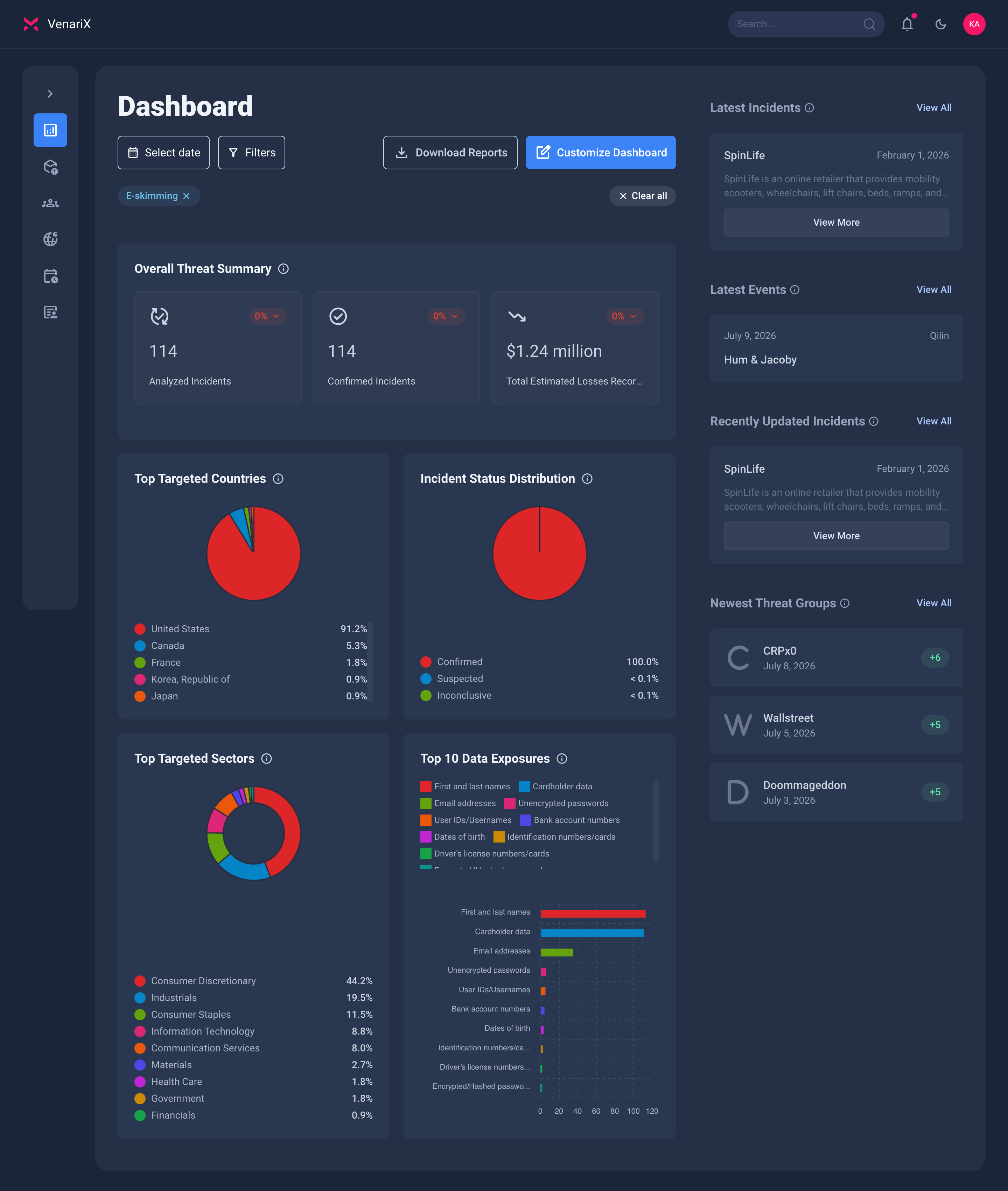
Our platform tracks e-skimming incidents globally. So far, we’ve confirmed over 91 incidents, with most disclosures coming from companies based in the United States. That doesn’t mean organizations in other countries aren’t affected. It simply reflects the fact that U.S. companies are more likely to report these breaches publicly due to specific data privacy laws and regulations.
The most commonly exposed data includes full names, cardholder data (such as card numbers, CVVs, and expiration dates), and email addresses. Most of the targeted organizations operate in retail or consumer products, which makes sense given their reliance on e-commerce platforms.
Analyze real-world e-skimming incidents in the VenariX Cyber Insights Platform. Sign up for a free account at https://www.venarix.com
Prevention and Detection
Reducing the risk of e-skimming incidents requires a multi-layered approach that encompasses technical controls, monitoring, and adherence to industry security standards. Both businesses and consumers play a role in mitigating this threat.
For Businesses (Merchants and Service Providers)
Patch management: Regularly patch e-commerce platforms, shopping cart software, other services, plugins, and operating systems to resolve vulnerabilities that attackers exploit for initial access.
Scripts management: Confirm that each script loaded and executed in the consumer browser is authorized and does not contain unauthorized or malicious content.
Detect unauthorized changes: Alert personnel to unauthorized modifications to security-impacting HTTP headers and script content on payment pages as received by the consumer’s browser.
Limit administrative access: Restrict access to administrative portals and accounts to only those who need them.
Secure admin panels: Ensure administrative panels and other privileged access are secured and not publicly accessible.
Use multi-factor authentication: Implement multi-factor authentication for administrative access to reduce the risk of password-based attacks.
Follow best practices: Ensure compliance with applicable PCI DSS security requirements.
For Consumers:
Pay attention to browser warnings about insecure pages.
Look for unexpected pop-ups, amateurish ads, and spelling or grammar errors on merchant sites, as these can indicate an infiltration or spoofing.
Set strong, unique passwords for all your online accounts.
Use virtual payment cards for online transactions when available. Consider using one-time cards, which can only be used for a single transaction.
Enable transaction alerts to be promptly notified of any suspicious activity on your accounts.
Routinely check your bank and credit card statements for any unexpected or odd charges.
